From Meeting Room to Live Preview in Minutes: How an AI UX Design Agent Changes Client Collaboration
The Scene You Know Too Well
Picture this: You are sitting in a meeting room. The projector hums. A design team presents carefully crafted mockups. Stakeholders squint at static screens, trying to imagine what the final product will feel like. Someone says, "Can we try it in blue?" The designer nods, makes a note, and promises to follow up next week.
This is how design decisions have been made for decades. And it works — but it is slow, expensive, and often leaves stakeholders guessing rather than seeing.
We just experienced something radically different.
A Simple Question That Usually Costs Days
We are building an online shop for Bonbon Müller, a traditional candy manufacturer from Duisburg crafting handmade sweets since 1949. The shop is live, the design is polished, and then a message drops in the team chat:
"I have been thinking — should the background color go more towards pastel blue or pink? It might create more of that candy atmosphere."
A perfectly reasonable question. In a traditional workflow, this triggers a chain: the design team discusses it, creates mockups, schedules a review, presents options, collects feedback, iterates. Easily a few days of work spread across multiple people.
Instead, we asked our AI UX design agent.
Not Random — Documented Design Rationale
Here is what happened within seconds. The AI agent did not just pick a color. It delivered a structured design analysis:
The Current Warm Neutral (#FAF8F5) was chosen deliberately to evoke heritage, craftsmanship, and natural ingredients — think old apothecary papers, parchment, handwritten recipes. It says: "We have been doing this since 1949, and we take our time." It pairs beautifully with the burgundy primary (#8B1A2B) and gold secondary (#D4883A), creating a warm, earthy palette that feels like stepping into an old Manufaktur.
The Pastel Suggestion was acknowledged as valid — a soft pink or powder blue would shift the brand feeling from "heritage apothecary" toward "delightful candy shop." Both are legitimate directions.
The Tension was articulated clearly: the brand tells two stories. One of Apotheker-Rezepturen and heritage. One of Bonbons, Freude, and Genuss. The background color is not decoration — it is a brand decision.
The Recommendation was nuanced: keep the warm neutral as the trustworthy foundation, but introduce subtle pastel accents in specific contexts — category pages tinted per product type, seasonal themes, hero sections with color hints. Heritage trust on the foundation, playful candy moments where they matter.
This is not a random suggestion. This is a documented design decision backed by brand analysis, color theory, and UX reasoning.
From Analysis to Interactive Prototype — In Minutes
But here is where it gets interesting. The agent did not stop at analysis. Within minutes, it created a fully interactive comparison tool — live on the actual website.
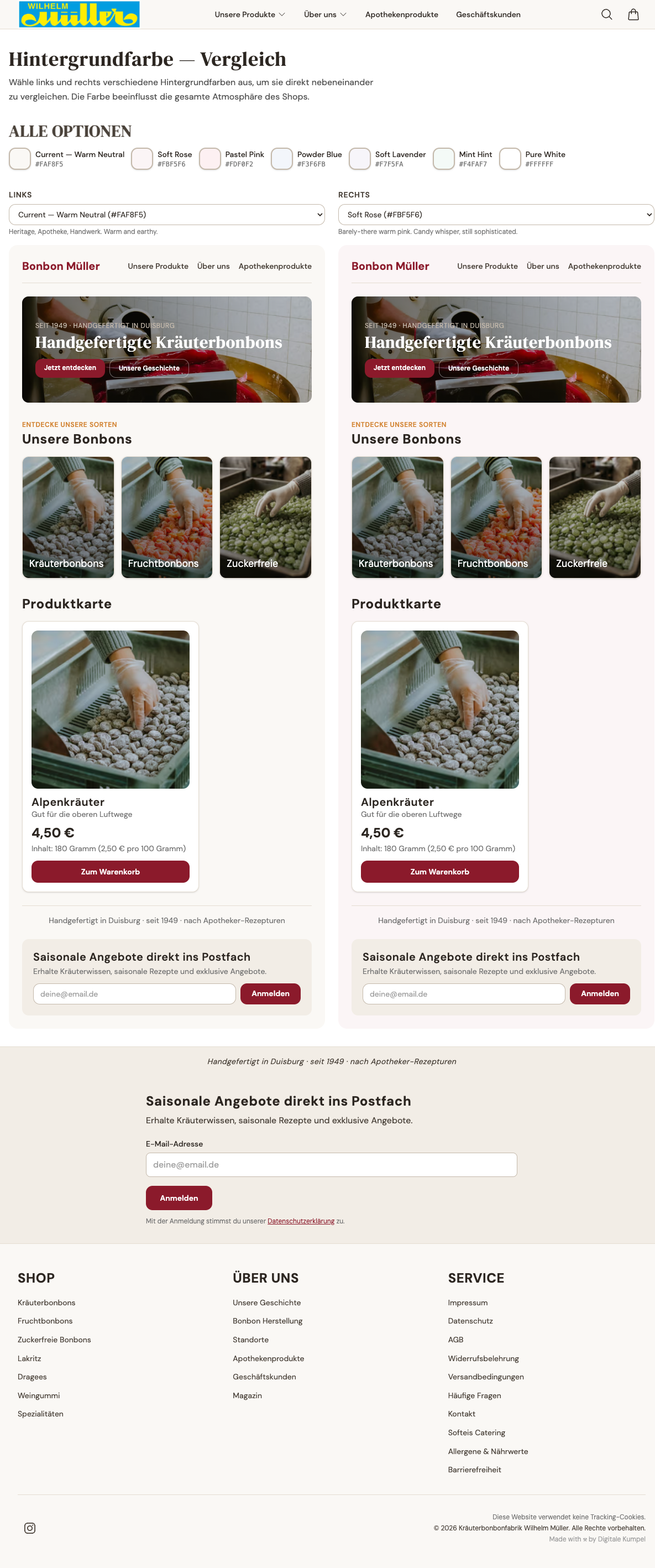
Visit bonbon-mueller.de/test-colors and see for yourself: a side-by-side comparison where you can select different background colors and immediately see how they affect the entire shop experience. Not a static mockup. Not a Figma prototype. The real shop components, rendered with real product images, real typography, real spacing — just with different background colors.
Seven options to compare: the current Warm Neutral, Soft Rose, Pastel Pink, Powder Blue, Soft Lavender, Mint Hint, and Pure White. Each with a description of the atmosphere it creates.
The client's reaction? "So geil. Der Typ weiss, was wir wollen." — "So awesome. This guy knows what we want."
The Real Shift: Cost and Speed
Let us talk about what this means in practice.
Traditional approach:
- Design team discussion: 1-2 hours
- Creating mockups for multiple color options: 4-8 hours
- Internal review and iteration: 2-4 hours
- Client presentation meeting: 1 hour
- Follow-up adjustments: 2-4 hours
- Total: 10-19 hours across multiple days, multiple people
AI UX agent approach:
- Ask the question: 1 minute
- Receive documented design rationale: instant
- Interactive comparison tool live on the site: minutes
- Client can test and decide on their own time: self-service
- Total: minimal effort, same day
The effort difference is not 2x or 5x. It is an order of magnitude.
What This Is NOT
Let us be clear about what we are not saying. This is not about replacing designers. The AI agent works because it was given a comprehensive design guide — a document that captures brand values, color rationale, typography decisions, spacing systems, and UX principles. Real designers created that foundation.
The design guide is why the agent's response was not "here are some pretty colors." It understood the tension between heritage and playfulness. It knew why #FAF8F5 was chosen. It could recommend where to use accents vs. where to maintain the foundation.
AI does not replace the thinking. It amplifies the execution.
What This Means for Client Collaboration
The old model: clients describe what they want, designers interpret, clients react to static images, everyone iterates until it is close enough.
The new model: clients raise questions, AI delivers both the reasoning and a live, interactive answer. Clients experience the options themselves. Decisions are faster, more informed, and better documented.
The client does not need to imagine what "a bit more pastel pink" looks like. They can see it. Right now. On the live site. Side by side with the current version.
The Takeaway
The next time someone in a meeting says "Can we try it in blue?" — the answer does not have to be "We will get back to you next week."
It can be: "Here is why we chose the current color, here is how blue would change the brand perception, and here is a live tool where you can compare them yourself."
That is the difference an AI UX design agent makes. Not random colors. Real design decisions, documented rationale, and interactive prototypes — at the speed of conversation.